
Our Peer Support program provides opportunities for members to participate in an inclusive and positive group setting.
We offer a variety of programs that are determined by our members each month including:
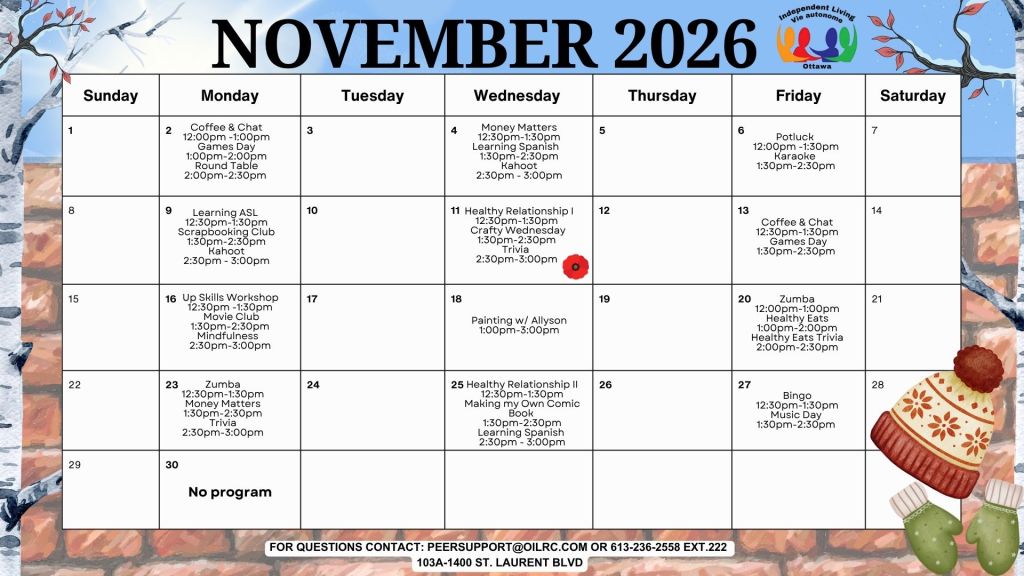
- November 2nd – Coffee & Chat 12:00 pm – 1:00 pm, Games Day 1:00 pm – 2:00 pm, Round Table 2:00 pm – 2:30 pm
- November 4th – Money Matters 12:30 pm – 1:30 pm, Learning Spanish 1:30 pm – 2:30 pm, Kahoot 2:30 pm – 3:00 pm
- November 6th – Potluck 12:00 pm – 1:30 pm, Karaoke 1:30 pm – 2:30 pm
- November 9th – Learning ASL 12:30 pm – 1:30 pm, Scrapbooking Club 1:30 pm – 2:30 pm, Kahoot 2:30 pm – 3:30 pm
- November 11th – Healthy Relationship I 12:30 pm – 1:30 pm, Crafty Wednesday 1:30 pm – 2:30 pm, Trivia 2:30 pm – 3:00 pm
- November 13th – Coffee & Chat 12:30 pm – 1:30 pm, Games Day 1:30 pm – 2:30 pm
- November 16th – Up Skills Workshop 12:30 pm – 1:30 pm, Movie Club 1:30 pm – 2:30 pm, Mindfulness 2:30 pm – 3:00 pm
- November 18th – Painting w/ Allyson 1:00 pm – 3:00 pm
- November 20th – Zumba 12:00 pm – 1:00 pm, Healthy Eats 1:00 pm – 2:00 pm, Healthy Eats Trivia 2:00 pm – 2:30 pm
- November 23rd – Zumba 12:30 pm – 1:30 pm, Money Matters 1:30 pm – 2:30 pm, Trivia 2:30 pm – 3:00 pm
- November 25th – Healthy Relationship II 12:30 pm – 1:30 pm, Making my Own Comic Book 1:30 pm – 2:30 pm, Learning Spanish 2:30 pm – 3:00 pm
- November 27th – Bingo 12:30 pm – 1:30 pm, Music Day 1:30 pm – 2:30 pm
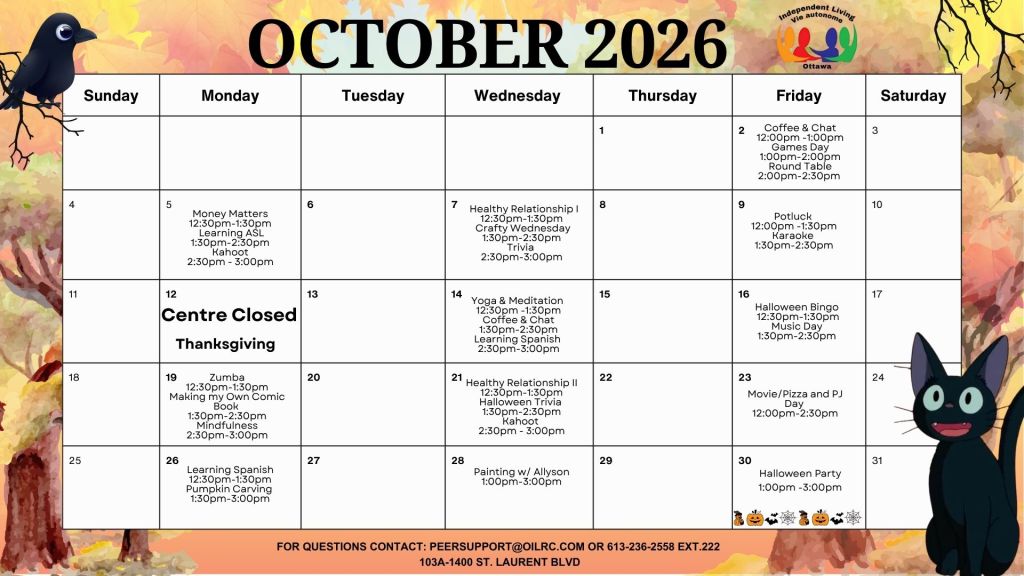
- October 2nd – Coffee & Chat 12:00 pm – 1:00 pm, Games Day 1:00 pm – 2:00 pm, Round Table 2:00 pm – 2:30 pm
- October 5th – Money Matters 12:30 pm – 1:30 pm, Learning ASL 1:30 pm – 2:30 pm, Kahoot 2:30 pm – 3:00 pm
- October 7th – Healthy Relationship I 12:30 pm – 1:30 pm, Crafty Wednesday 1:30 pm – 2:30 pm, Trivia 2:30 pm – 3:00 pm
- October 9th – Potluck 12:00 pm – 1:30 pm, Karaoke 1:30 pm – 2:30 pm
- October 12th – Centre Closed Thanksgiving
- October 14th – Yoga & Meditation 12:30 pm – 1:30 pm, Coffee & Chat 1:30 pm – 2:30 pm, Learning Spanish 2:30 pm – 3:00 pm
- October 16th – Halloween Bingo 12:30 pm – 1:30 pm, Music Day 1:30 pm – 2:30 pm
- October 19th – Zumba 12:30 pm – 1:30 pm, Making My Own Comic Book 1:30 pm – 2:30 pm, Mindfulness 2:30 pm – 3:00 pm
- October 21st – Healthy Relationship II 12:30 pm – 1:30 pm, Halloween Trivia 1:30 pm – 2:30 pm, Kahoot 2:30 pm – 3:00 pm
- October 23rd – Movie/Pizza and PJ Day 12:00 pm – 2:30 pm
- October 26th – Learning Spanish 12:30 pm – 1:30 pm, Pumpkin Carving 1:30 pm – 3:00 pm
- October 28th – Painting w/ Allyson 1:00 pm – 3:00 pm
- October 30th – Halloween Party 1:00 pm – 3:00 pm
- Recreation & Active Living (e.g. Yoga & Meditation, Zumba, Walking Club)
- Social Programs (e.g. Trivia, games, Coffee & Chat, Bingo, pancake brunches)
- Skills & Workshops (e.g. goal setting, employment skills, financial literacy, language skills, healthy relationships)
- Arts & Wellness (e.g. Music, arts & crafts, painting, healthy eats)
- Community Programs (e.g. museums, movies, art markets, festivals, day trips, picnics, seasonal activities)
Registering for Program
Important Update for our members and our community
Starting July 1, OILRC will no longer use My Community Hub for program registrations.
For more information, see post.
To register for any of our programs, simply:
Visit our centre in person, or Email us at peersupport@oilrc.com
Interested in becoming an OILRC member?
We’d love to meet you! The first step is to schedule a visit by contacting our Peer Support team by email or phone. After your visit, you will have the opportunity to learn more about OILRC, connect with our community, and decide if membership is right for you.
We look forward to welcoming new members and helping you become part of our growing, supportive community!
Thank you for your continued support.
