
Our Peer Support program provides opportunities for members to participate in an inclusive and positive group setting.
We offer a variety of programs that are determined by our members each month including:
- Recreation & Active Living (e.g. Yoga & Meditation, Zumba, Karate, Walking Club)
- Social Programs (e.g. Trivia, games, Coffee & Chat, Bingo, pancake brunches)
- Skills & Workshops (e.g. goal setting, employment skills, financial literacy, language skills, healthy relationships)
- Arts & Wellness (e.g. Music, arts & crafts, painting, healthy eats)
- Community Programs (e.g. museums, movies, art markets, festivals, day trips, picnics, seasonal activities)
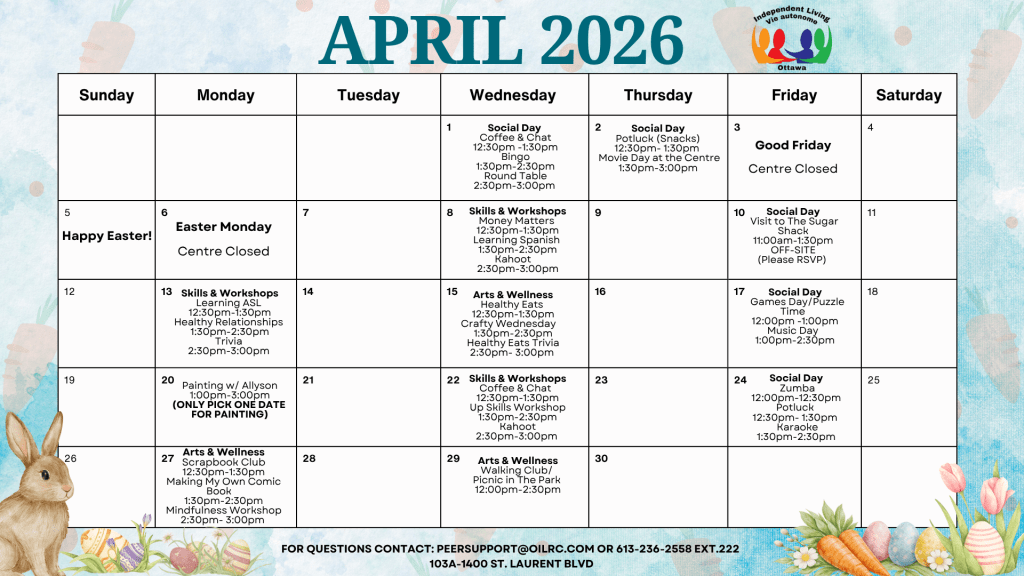
- April 1st – Coffee & Chat 12:30 pm – 1:30 pm, Bingo 1:30 pm – 2:30 pm, Round Table 2:30 pm – 3:00 pm
- April 2nd – Potluck (Snacks) 12:30 pm – 1:30 pm, Movie Day at the Centre 1:30 pm – 3:00 pm
- April 8th – Money Matters 12:30 pm – 1:00 pm, Learning Spanish 1:30 pm – 2:30 pm, Kahoot 2:30 pm – 3:00 pm
- April 10th – Visit to The Sugar Shack 11:00 am – 1:30 pm OFF-SITE (Please RSVP)
- April 13th – Learning ASL 12:30 pm – 1:30 pm, Healthy Relationships 1:30 pm – 2:30pm, Trivia 2:30 pm – 3:00 pm
- April 15th – Healthy Eats 12:30 pm – 1:30 pm, Crafty Wednesday 1:30 pm – 2:30 pm, Healthy Eats Trivia 2:30 pm – 3:00 pm
- April 17th – Games Day/Puzzle Time 12:00 pm – 1:00 pm, Music Day 1:00 pm – 2:30 pm
- April 20th – Painting w/ Allyson 1:00 pm – 3:00 pm (ONLY ONE SESSION)
- April 22nd – Coffee & Chat 12:30 pm – 1:30 pm, Up Skills Workshop 1:30 pm – 2:30 pm, Kahoot 2:30 pm – 3:00 pm
- April 24th – Zumba 12:00 pm – 12:30 pm, Potluck 12:30 pm – 1:30 pm, Karaoke 1:30 pm – 2:30 pm
- April 27th – Scrapbook Club 12:30 pm – 1:30 pm, Making My Own Comic Book 1:30 pm – 2:30 pm, Mindfulness Workshop 2:30 pm – 3:00 pm
- April 29th – Walking Club/ Picnic in The Park 12:00 pm – 2:30 pm
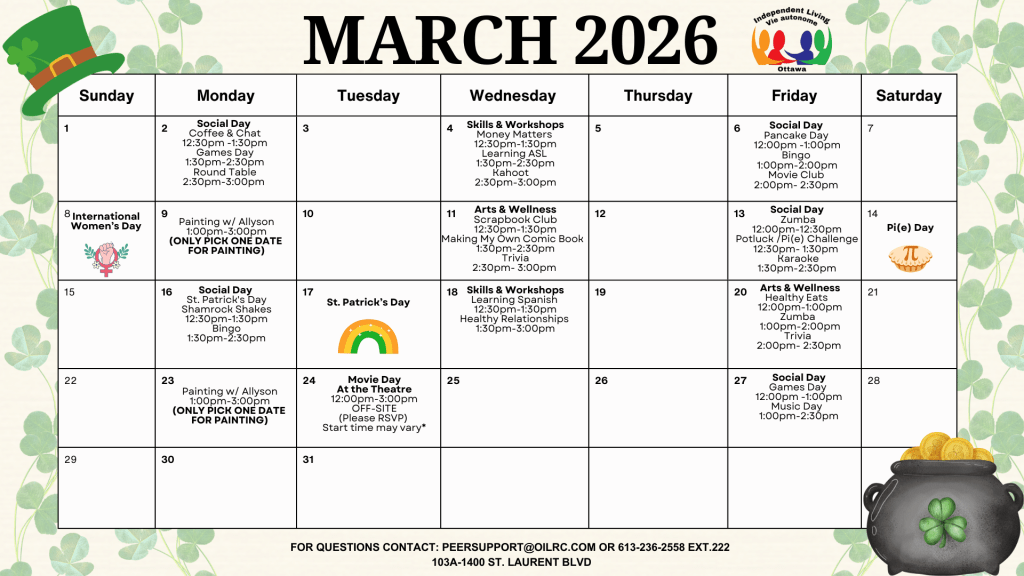
- March 2nd – Coffee & Chat 12:30 pm – 1:30 pm, Games Day 1:30 pm – 2:30 pm, Round Table 2:30 pm – 3:00 pm
- March 4th – Money Matters 12:30 pm – 1:30 pm, Learning ASL 1:30 pm – 2:30 pm, Kahoot 2:30 pm – 3:00 pm
- March 6th – Pancake Day 12:00 pm – 1:00 pm, Bingo 1:00 pm – 2:00 pm, Movie Club 2:00 pm – 2:30 pm
- March 9th – Painting w/ Allyson 1:00 pm – 3:00 pm (ONLY PICK ONE DATE FOR PAINTING)
- March 11th – Scrapbook Club 12:30 pm – 1:30 pm, Making My Own Comic Book 1:30 pm – 2:30 pm, Trivia 2:30 pm- 3:00 pm
- March 13th – Zumba 12:00 pm – 12:30 pm, Potluck /Pi(e) Challenge 12:30 pm – 1:30 pm, Karaoke 1:30 pm – 2:30 pm
- March 16th – St. Patrick’s Day Shamrock Shakes 12:30 pm – 1:30 pm, Bingo 1:30 pm – 2:30 pm
- March 18th – Learning Spanish 12:30 pm – 1:30 pm, Healthy Relationships 1:30 pm – 3:00 pm
- March 20th – Healthy Eats 12:00 pm – 1:00 pm, Zumba 1:00 pm – 2:pm, Trivia 2:00 – 2:30 pm
- March 23rd – Painting w/ Allyson 1:00 pm – 3:00 pm (ONLY PICK ONE DATE FOR PAINTING)
- March 24th – Movie Day at the Theatre 12:30 pm – 3:00 pm OFF-SITE (Please RSVP)
- March 27th – Games Day 12:00 pm – 1:00 pm, Music Day 1:00 pm – 2:30 pm
Registering for Programs
Note: If you do not have an account on MyCommunityHub you can get the instructions on creating one by clicking on the “Creating An Account” section below.
- Go on the home page and use the search bar to look up “Ottawa Independent Living Resource Centre”. Alternatively you can click on this link to take you there directly.
- This should show you all the programs we have scheduled for the month. You can look at them in a list or as a calendar view, control this by clicking on the options at the top left corner of the activity list.
- Simply look for any programs you are interested in attending, and click on “add to cart” as if you were online shopping.
- Once you have everything you are interested in, go to checkout just like you would an online shopping website. Review your activities, and confirm your registration!
- Once this is done, you will receive a receipt to your email with all the necessary information about your programs. You can also view your calendar with all the things you have signed up for in the month on your account.
Creating An Account
- Go to https://mycommunityhub.ca/ and click on “create account” on the top right corner of the screen.
- Put in the necessary information (your email, password and such).
- If you are creating this account to register someone else for programs as a caregiver or support worker, once you get to the “emergency contact” portion, you can click on “create account and add participant”. This will allow you to manage your account as a support worker/family member/caretaker and register the person you are supporting. If you are creating this account for yourself, just click on “create account”.
